You just spent three hours filming and editing a video. The visual is perfect. The audio is crisp. But now you are staring at a blinking text cursor, completely blanking on what to write.
Jump to a section:
- Quick Answer: What Makes a Caption Sell?
- Stop Guessing: Why Caption Templates Are Your Secret Sales Weapon
- How to Customize These Templates for Your Unique Brand Voice
- Group 1: Direct Offer and High-Intent Sales Templates
- Group 2: Value-First and Authority-Building Templates
- Group 3: Social Proof and Trust-Building Templates
- 5 Mistakes That Kill Your Caption Conversions
- Scaling Your Output: From Manual Writing to Repeatable Success
- Frequently Asked Questions About Writing Sales Captions
- Start Turning Your Captions into Revenue Today
We have all been there. You want to make money from your content, but writing sales copy feels gross or impossible. You end up typing a weak "link in bio" and watching the post flop.
Learning how to write captions that sell is the difference between building an audience and building a business. If you cannot convert attention into action, those views are just vanity metrics.
Quick Answer: What Makes a Caption Sell?
A caption that sells combines a scroll-stopping hook, a relatable problem, a specific solution, and a clear call-to-action. The secret isn't being salesy. It is matching your audience's intent with extreme clarity so the next step feels like a natural progression, not a pitch.
Stop Guessing: Why Caption Templates Are Your Secret Sales Weapon
Starting from a blank screen is a waste of your creative energy.
When you use proven copywriting frameworks, you remove the friction of writing and tap directly into human psychology. Good sales copy works because it follows a structure the brain already expects and responds to. It is about pattern recognition. According to data from Sprout Social, consumers are far more likely to buy from brands that communicate their value clearly and transparently on social channels.
Instead of hoping inspiration strikes, templates give you a skeleton. You just add your brand's meat to the bones.
How to Customize These Templates for Your Unique Brand Voice
Templates only fail when you treat them like fill-in-the-blank worksheets.
If you just paste them verbatim, you will sound like every other creator on the feed. The trick is to inject your specific vocabulary. Do you use casual slang? Professional jargon? Dry humor? Keep your personality. The template provides the structural mechanism—the hook, the transition, the pitch. You provide the soul.
Now let's break down how to write captions that sell using these proven frameworks.
Group 1: Direct Offer and High-Intent Sales Templates
These are bottom-of-the-funnel scripts. Use them when your primary goal is to drive an immediate purchase or sign-up.
The 'Problem-Agitate-Solution' (PAS) Framework
The PAS framework works because it validates the reader's current struggle before offering a cure. Attention spans are incredibly short. If you don't immediately signal that you understand their problem, they will keep scrolling.
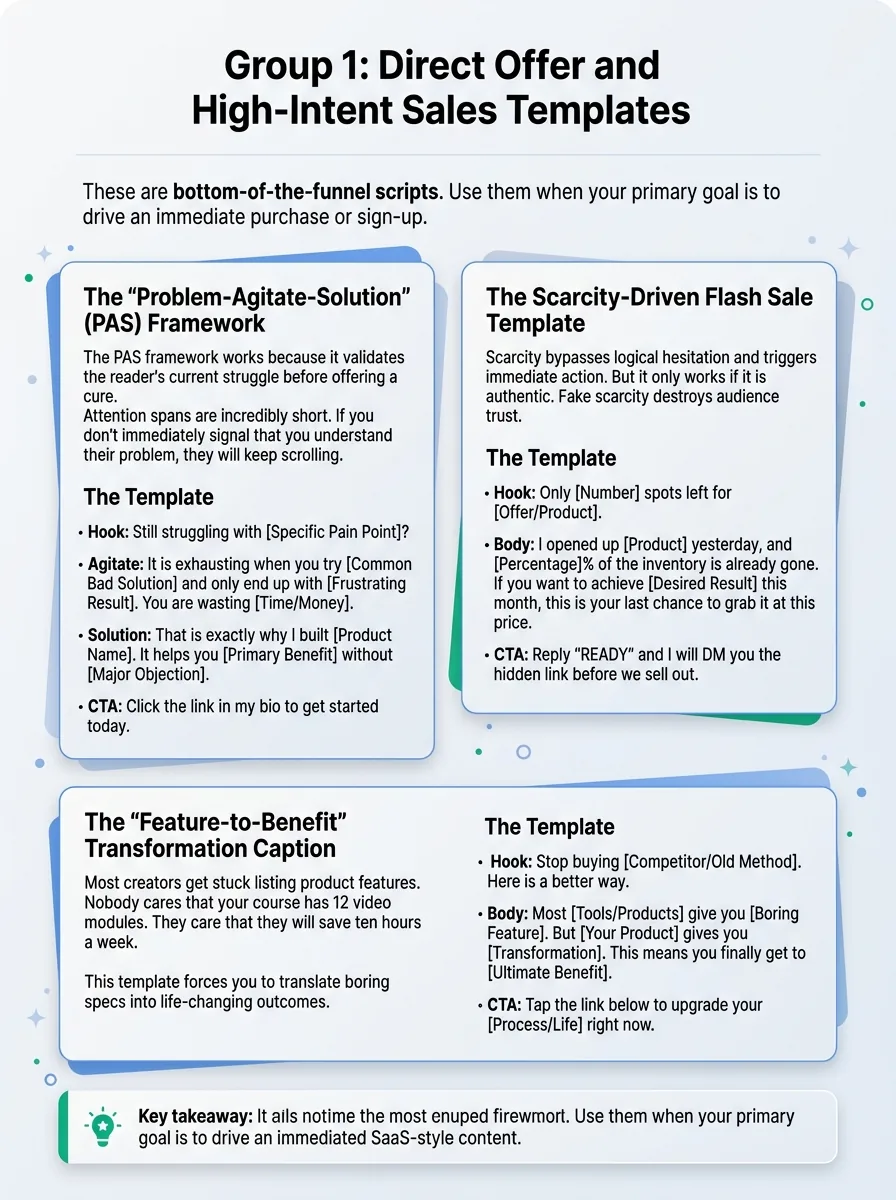
The Template:
- Hook
Still struggling with [Specific Pain Point]?
- Agitate
It is exhausting when you try [Common Bad Solution] and only end up with [Frustrating Result]. You are wasting [Time/Money].
- Solution
That is exactly why I built [Product Name]. It helps you [Primary Benefit] without [Major Objection].
- CTA
Click the link in my bio to get started today.
The Scarcity-Driven Flash Sale Template
Scarcity bypasses logical hesitation and triggers immediate action. But it only works if it is authentic. Fake scarcity destroys audience trust.
The Template:
- Hook
Only [Number] spots left for [Offer/Product].
- Body
I opened up [Product] yesterday, and [Percentage]% of the inventory is already gone. If you want to achieve [Desired Result] this month, this is your last chance to grab it at this price.
- CTA
Reply "READY" and I will DM you the hidden link before we sell out.
The 'Feature-to-Benefit' Transformation Caption
Most creators get stuck listing product features. Nobody cares that your course has 12 video modules. They care that they will save ten hours a week. This template forces you to translate boring specs into life-changing outcomes.
The Template:
- Hook
Stop buying [Competitor/Old Method]. Here is a better way.
- Body
Most [Tools/Products] give you [Boring Feature]. But [Your Product] gives you [Transformation]. This means you finally get to [Ultimate Benefit].
- CTA
Tap the link below to upgrade your [Process/Life] right now.
Group 2: Value-First and Authority-Building Templates
Middle-of-the-funnel content builds trust. You give away something valuable to prove your expertise.
The 'Myth-Buster' Unpopular Opinion Template
Calling out a common industry lie is a massive pattern interrupt. It positions you as the honest insider protecting your audience from bad advice.
The Template:
- Hook
Unpopular opinion: [Common Industry Belief] is completely dead.
- Body
Everyone tells you to do [Mainstream Advice]. But in practice, that just leads to [Bad Outcome]. What actually works is [Your Unique Method]. I put my entire system inside [Product].
- CTA
Grab the guide at the link in my bio.
The Step-by-Step Micro-Tutorial Swipe
Give away a tiny, immediate win. Once they see your free advice works, they will happily pay for the full system. This format is also incredibly effective if you are figuring out how to write captions that get comments, since actionable steps trigger high save rates and questions.
The Template:
- Hook
How to achieve [Specific Goal] in [Timeframe]:
- Body
Step 1: [Actionable advice]. Step 2: [Actionable advice]. Step 3: [Actionable advice]. Want the exact templates I use to do this on autopilot?
- CTA
Comment "SYSTEM" and I will send you the exact blueprint.
The 'Curated Resources' Authority Multiplier
Curation is a service. Compiling a list of tools or tips saves your audience time, which builds massive goodwill.
The Template:
- Hook
The 3 exact tools I use to [Achieve Result].
- Body
1. [Tool/Concept A] for [Benefit]. 2. [Tool/Concept B] for [Benefit]. 3. [Your Product] for [Ultimate Benefit]. I spent years figuring this stack out so you don't have to.
- CTA
Bookmark this post for later, and click my bio link to grab tool number three.
Group 3: Social Proof and Trust-Building Templates
Trust is the ultimate currency. These templates borrow credibility from your successful customers.
The 'Before-and-After' Client Transformation
Showing the contrast between where a customer started and where they finished proves your product works. When doing this, make sure you know how to write a bio that converts profile visitors, because transformation stories always drive a spike in profile clicks.
The Template:
- Hook
From [Painful State] to [Dream State] in just [Timeframe].
- Body
Meet [Client Name]. They were struggling with [Specific Problem] and were about to give up. We implemented [Your Product/Method]. Look at them now.
- CTA
If you want these exact results, tap the link in my bio to apply.
The 'Screenshot of Praise' Social Proof Caption
A raw, unedited screenshot of a customer DM is often more believable than a highly produced video testimonial.
The Template:
- Hook
Messages like this are why I do what I do.
- Body
[Customer Name] just sent me this after using [Product] for only a week. They finally achieved [Specific Result] without the usual headache of [Common Problem].
- CTA
Ready for your own win? Grab your copy at the link below.
The 'Common Question' Objection-Killer Template
People want to buy, but they are subconsciously looking for a reason to say no. Address their hidden objections publicly.
The Template:
- Hook
"Will [Product] actually work for my specific situation?"
- Body
I get this question every day. The short answer is yes. If you are struggling with [Pain Point A] or [Pain Point B], this was built exactly for you. It removes [Obstacle] so you can focus on [Result].
- CTA
Still on the fence? DM me your specific question and I will give you an honest answer.
5 Mistakes That Kill Your Caption Conversions
You can use every template above and still hear crickets if you commit these critical errors. Here is why most people still don't get results:
- Writing generic hooks with no target and no promise.
"Here are some tips" is vague. "3 hooks that doubled my newsletter growth" is specific and promises a clear outcome.
- Stacking 3 ideas in one opening line.
Trying to be too clever confuses the reader. Pick one core idea per post and stick to it.
- The Wall of Text.
If your caption doesn't have line breaks, nobody is reading it. White space is essential for scanning behavior.
- Copying viral hooks without matching audience intent.
Borrowing a meme format for a high-ticket B2B consulting offer usually falls flat. The format must match the mindset of the buyer.
- Using vague claims like "this changed everything."
Show, don't just tell. Say "this saved me 4 hours a week" instead of relying on empty hyperbole.
Scaling Your Output: From Manual Writing to Repeatable Success
The real problem isn't knowing what a good sales caption looks like. It is producing enough quality variations consistently without spending an hour per post.
If you have to manually script, edit, and optimize every single post across five platforms, you will burn out. Fast. That is why smart creators rely on a dedicated caption generator to do the heavy lifting. You just type in your post topic, select your desired platform and tone, and get multiple high-converting variations complete with hooks, body copy, and hashtags.
Start creating viral content today
Join other creators who've transformed their social media presence with AI-powered content.
Start creating nowYou review the options, tweak the one that fits best, and hit publish. Consistent output becomes effortless.
Frequently Asked Questions About Writing Sales Captions
How long should a sales caption be?
Long enough to overcome objections, but short enough to keep attention. On Instagram, 100-150 words often works best for sales, while LinkedIn rewards slightly longer, story-driven formats.
Should I use emojis in sales copy?
Yes, but sparingly. Use emojis as bullet points or visual breaks to guide the eye down the page. Don't clutter your sentences with them.
How often should I post direct sales captions?
Follow the 80/20 rule. Eighty percent of your content should educate, entertain, or inspire. Twenty percent should be direct, high-intent asks.
Start Turning Your Captions into Revenue Today
Stop overthinking your sales copy. Pick one of the templates above, plug in your specific brand details, and post it today.
Write Captions That Get Engagement
Generate scroll-stopping captions that drive likes, comments, and shares.
Try Caption GeneratorThe perfect caption doesn't exist. But a published caption always beats a draft sitting in your notes app.